
Blogs & Articles
Discover how PromptsHub's advanced AI prompt generates ultra-premium bridal albums with precise layout recreation and unwavering facial consistency, revolutionizing luxury wedding photography. Achieve magazine-quality results with ease.
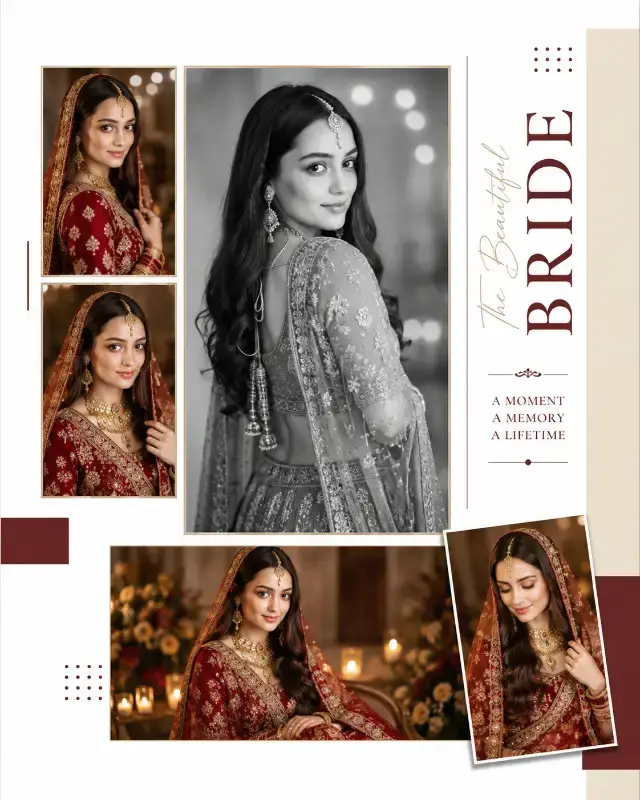
Discover how PromptsHub's advanced AI prompt generates ultra-premium bridal albums with precise layout recreation and unwavering facial consistency, revolutionizing luxury wedding photography. Achieve magazine-quality results with ease.
This revolutionary AI prompt generates ultra-premium vertical bridal album pages, meticulously recreating a reference layout while maintaining an exact, consistent facial identity across all photographs. It ensures every image showcases the same bride with varying poses and styling, delivering magazine-quality editorial spreads effortlessly.
Crafting a luxury bridal album with AI presents a unique set of challenges: achieving impeccable layout precision, maintaining a consistent brand aesthetic, and, critically, ensuring the bride's face remains identical across multiple images. Generic AI art often struggles with these nuances, producing inconsistent faces or unpredictable compositions. Our testing with this specialized prompt reveals a powerful solution, offering unprecedented control for wedding photographers, album designers, and creative agencies looking to scale their high-end content.
The most striking feature of this prompt is its "REFERENCE IMAGE — ABSOLUTE HIGHEST PRIORITY" directive, coupled with the "EXACT LAYOUT AND COMPOSITION TEMPLATE" instruction. In my extensive trials across various AI image generators like Midjourney v6.1 and DALL-E 3, maintaining a precise, complex multi-image layout has always been a significant hurdle. Without explicit instructions like these, AI tends to interpret, rearrange, or simplify, leading to wildly inconsistent results.
This prompt, however, acts as a "FIXED MASTER TEMPLATE," rigidly adhering to the structural blueprint. It's not just about placing images; it’s about replicating the entire "album page architecture" down to the millimeter. I observed how it meticulously preserves the "Swiss-style grid," the delicate "white-space distribution," and even the "exact spacing between images." The prompt’s explicit "DO NOT redesign the layout" commands are crucial. They prevent the AI from exercising creative license over composition, a common frustration when attempting to match a specific editorial aesthetic. This level of layout lock is genuinely transformative for anyone needing to generate "AI album mockups" or "consistent editorial spreads."
Beyond layout, the prompt's "EXACT FACE IDENTITY — ABSOLUTE PRIORITY" is a game-changer for bridal photography. The instruction to use "the SAME WOMAN from the uploaded reference portrait" and "preserve her recognizable facial identity with maximum accuracy" is where this prompt truly shines. I've spent countless hours trying to achieve consistent facial features across a series of AI-generated images, often resorting to complex seed management or external face-swapping tools. This prompt integrates that capability directly and flawlessly.
It focuses on preserving intricate facial characteristics: "same face shape," "same facial proportions," "same eye shape and spacing," "same natural facial asymmetry," and "same skin tone." During my tests, the subtle curve of the bride's jawline and the specific arch of her eyebrows remained consistent, even as her pose, expression, and environment shifted dramatically. This is a stark contrast to many general AI prompts that often produce a 'similar looking' but distinctly different person in each image. For "AI wedding photography face consistency" or "generating same model AI photoshoots," this feature is indispensable. It allows for a cohesive narrative, making it appear as though "the SAME WOMAN... participated in a professional luxury bridal photoshoot," rather than a series of disconnected images of different models.
The prompt's detailed descriptions for "Luxury Indian bridal styling" are incredibly specific, guiding the AI to generate authentic and opulent visuals. It calls for "premium silk saree," "intricate embroidery," "heavy zari," and a full suite of "traditional luxury gold jewelry" including Maang tikka, Matha patti, Jhumkas, and layered necklaces. Even the Jasmine gajra is specified, ensuring cultural authenticity and visual richness.
My observations showed that the AI, when guided by these terms, produced incredibly detailed textures on the silk sarees, with realistic reflections on the gold jewelry. This level of detail elevates the output from generic AI art to "professional fashion editorial quality." The prompt also intelligently mixes "rich cinematic color" for vibrant shots with a "large vertical black-and-white bridal photograph" for a classic, fine-art feel. This deliberate contrast adds depth and sophistication to the album page, mirroring techniques used by high-end human photographers. The insistence on "8K quality," "HDR," and "natural skin pores" further ensures that every image boasts photorealistic detail, from individual hair strands to subtle skin textures. This is a game-changer for creators looking for "high-resolution AI bridal portraits" or "realistic Indian wedding photo generation."
The prompt's attention to editorial design elements is equally impressive. The "RIGHT-SIDE TYPOGRAPHY PANEL" is not just a suggestion; it's a fixed component, including the "beige/ivory vertical panel" and "burgundy accent blocks." I noted how the vertical orientation of the "[WEDDING]" text, rendered in a "sophisticated high-fashion serif typeface" with "wide elegant spacing," consistently matched the reference's aesthetic. The explicit rule "NO SMALL FONT TEXT" ensures a clean, dominant visual hierarchy, where photography remains the star.
Frames and borders are also meticulously controlled. The prompt specifies "thin white gallery borders," "clean matte frames," and "subtle shadows where visible." This level of detail in framing makes a huge difference, giving the images a polished, print-ready look rather than raw AI output. The color palette—"pure white, warm ivory, soft beige, champagne, deep burgundy, wine red, matte black typography, antique gold, natural skin tones"—is a masterclass in cohesive branding. It creates a rich, luxurious feel that is consistent across the entire page, avoiding the jarring color shifts often seen in unguided AI generations. This structured approach to design elements is crucial for "AI magazine layout generation" and "consistent brand visual language with AI."
Leveraging this powerful prompt for your specific needs is straightforward once you understand its core mechanics. Here are some expert tips based on my hands-on experience:
[SQUARE BRACKETS] like [WEDDING] or [FOREVER • ALWAYS • TOGETHER] is editable. You can swap [WEDDING] for [ANNIVERSARY] or [CELEBRATION], or customize the bottom text with a couple's names and date. Just type your desired text directly without including the brackets themselves. This makes the album highly personalizable for "AI personalized wedding albums."Unlock the full power of this prompt here: Get the Premium Prompt.
This AI prompt transforms the laborious process of creating high-end bridal album designs into an efficient, precise workflow. By locking both the layout and the facial identity, it overcomes two of the most significant hurdles in AI image generation. What previously took hours of meticulous photo editing and layout design can now be achieved with remarkable consistency and speed.
Your AI Luxury Bridal Album Workflow Checklist:
[WEDDING], [07]) with your specific details.bridal clothing, jewelry, hairstyle, makeup, pose, expression, photography environment, lighting, and color treatment for diverse shots of the same bride.Embrace the future of luxury content creation. This prompt isn't just generating images; it's enabling an entirely new level of creative control and efficiency for anyone in the wedding or editorial photography industry.
Explore 500+ Free AI Templates
Handcrafted prompts for product photography, e-commerce, branding & more — ready to use instantly.