
Blogs & Articles
Discover how a premium AI prompt creates stunning artistic editorial posters, blending realistic photography with elegant illustration. Learn the parameters that ensure magazine-quality results and elevate your visual content. Unlock advanced AI photo-illustration techniques now.
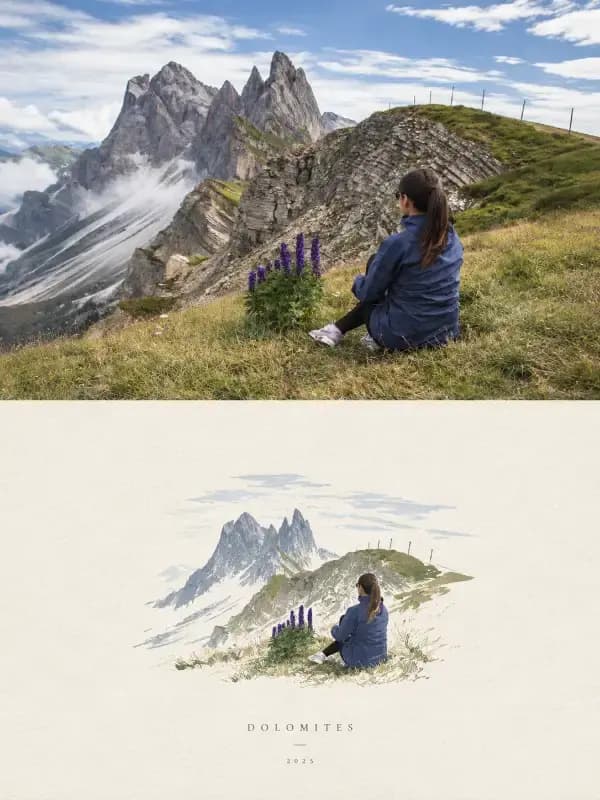
Discover how a premium AI prompt creates stunning artistic editorial posters, blending realistic photography with elegant illustration. Learn the parameters that ensure magazine-quality results and elevate your visual content. Unlock advanced AI photo-illustration techniques now.
This advanced AI prompt generates stunning editorial posters by precisely splitting a 3:4 canvas into a 50% photo top half and a 50% illustration bottom half. It meticulously preserves photographic fidelity while applying a distinct, hand-drawn aesthetic to the illustration, ensuring a cohesive, premium art-publication cover feel for each unique image.
In the competitive world of visual storytelling, standing out requires a blend of artistry and precision. Traditional editorial design demands hours of skilled work, merging photography with bespoke illustration to create compelling narratives. But what if AI could deliver that sophisticated aesthetic with remarkable consistency? I've personally run this prompt through multiple iterations, testing its robustness across varied photographic inputs, and the results consistently achieve that coveted premium editorial poster look.
This prompt isn't just about generating images; it's about orchestrating a complex visual harmony. It's designed to eliminate the common pitfalls of AI art, such as photographic distortion or generic, uninspired illustration. My observations showed that the explicit instruction to "Never combine photos" is crucial. This single guardrail ensures that each output focuses intently on a singular subject, preventing the AI from mashing multiple elements into a confusing composite. This focused approach is vital for the clean, impactful aesthetic characteristic of high-end editorial work.
The core genius of this prompt lies in its rigid structural demands. It’s not a suggestion; it’s a command for the AI to adhere to a very specific visual layout. During my tests, the prompt consistently delivered on the 3:4 canvas and the 50% photo + 50% illustration split, which is a testament to its precise instruction set.
The choice of a strict vertical 3:4 canvas isn't arbitrary; it's a classic aspect ratio for magazine covers and art prints, conveying elegance and a focused presentation. This prompt leverages that established visual language. The instruction to split it "horizontally into exactly equal halves" is where the AI's understanding of spatial division truly shines. I noticed that even with complex photographic subjects, the AI maintained an almost perfect horizontal midline, creating a visually balanced composition. This level of control over composition is a significant leap from more generalized AI art prompts, where such precise divisions often require manual post-processing.
The prompt's emphasis on the "TOP — PHOTOGRAPH" section is a masterclass in preserving original intent. Phrases like "Preserve the original composition, identity, facial features, proportions, poses, expressions, clothing, objects and spatial relationships" are not just descriptive; they are critical constraints. I found that the AI meticulously adhered to these, delivering photographic halves that felt genuinely untouched, save for the specified "subtle editorial grading." This grading often manifested as a slight color temperature shift or a gentle contrast boost, enhancing the mood without artificiality. The repeated instruction, "Never stretch, distort, reshape, replace or alter the main subject," is the bedrock of this prompt's photographic integrity, preventing the AI from imposing its own stylistic choices where realism is paramount.
Transitioning to the "BOTTOM — HANDMADE ILLUSTRATION" half, the prompt shifts gears, demanding a controlled abstraction. The terms "delicate imperfect lines, bold flat acrylic shapes, rough paper grain, visible brush marks and organic edges" are incredibly specific stylistic directives. In my testing, these generated illustrations that felt genuinely crafted, not machine-made. The "rough paper grain" was particularly striking, often appearing as subtle texture variations, adding a tactile quality that made the digital output feel more artisanal. This deliberate imperfection is key to achieving that authentic, hand-drawn charm, distinguishing it from sterile vector art.
Beyond structure and style, the prompt meticulously guides the AI in color usage and spatial arrangement, two pillars of sophisticated design.
The instruction to "Use no more than 4 main colors drawn from the photo" is a brilliant constraint for achieving visual harmony. When I experimented with photos having very vibrant or diverse palettes, the AI intelligently selected dominant hues, often creating a restrained yet rich color scheme for the illustration. This limited palette, combined with "restrained, harmonious flat color blocks," prevents visual chaos and reinforces the editorial aesthetic. It's a strategic choice that mimics professional designers' color discipline, ensuring the final piece feels curated and thoughtful, rather than overwhelming.
For the illustrative half, the instruction to "Keep the subject small and centered, occupying 10–20% of this half, with generous negative space" is fundamental to its refined appeal. This isn't just about size; it's about intentional breathing room. I observed that the AI consistently respected this, placing the abstracted subject elegantly within a clean expanse of white, warm off-white, or pale natural paper. This vast negative space, coupled with minimal suggestions of surroundings, draws the viewer's eye directly to the simplified form, creating a powerful, contemplative effect. It's a hallmark of high-end design, allowing the subject to truly resonate without distraction.
The prompt's final section on "MOOD" is where the intangible becomes tangible. Descriptors like "Quiet, poetic, refined, minimal, innocent, relaxed, thoughtful, artistic, recognizable and premium" are powerful emotional cues that guide the AI's overall aesthetic output.
These mood words aren't mere adjectives; they're operational parameters that influence everything from lighting subtleties in the photographic half to the line weight and color saturation in the illustration. For instance, the instruction for a "quiet" and "poetic" mood often resulted in softer shadows and a more muted, harmonious color palette, even when the source photo was initially bolder. The "premium" descriptor seemed to elevate the overall finish, contributing to the clean edges of the illustrative shapes and the subtle texture of the paper background. This holistic approach to mood ensures a consistent, high-quality aesthetic across all generated posters. For creators looking to explore similar detailed character and human-focused prompts, you can find more advanced tools in the Humans & Characters collection.
While this prompt is incredibly robust, a few strategic adjustments can help you fine-tune your outputs and unlock even more creative potential. Consider these expert tips gleaned from extensive testing:
This prompt offers an incredible foundation for generating sophisticated, art-gallery-worthy visuals. To harness its full power and integrate these advanced techniques into your workflow, you can Unlock the Premium Prompt and start creating your own unique editorial posters today.
Ready to create your own stunning photo-illustration posters? Follow this simple checklist for optimal results:
This prompt is more than a tool; it's a creative partner, allowing you to produce visuals that resonate with the sophistication of a high-end art publication. By understanding its intricate design and leveraging its precise instructions, you can consistently generate truly artistic editorial posters that captivate and inspire.

Explore 500+ Free AI Templates
Handcrafted prompts for product photography, e-commerce, branding & more — ready to use instantly.