
Blogs & Articles
Discover how to create breathtaking, identity-preserved luxury newborn baby portraits using advanced AI prompts. Master specific parameters for lighting, composition, and styling to achieve magazine-quality results, ensuring your baby's unique features shine through.
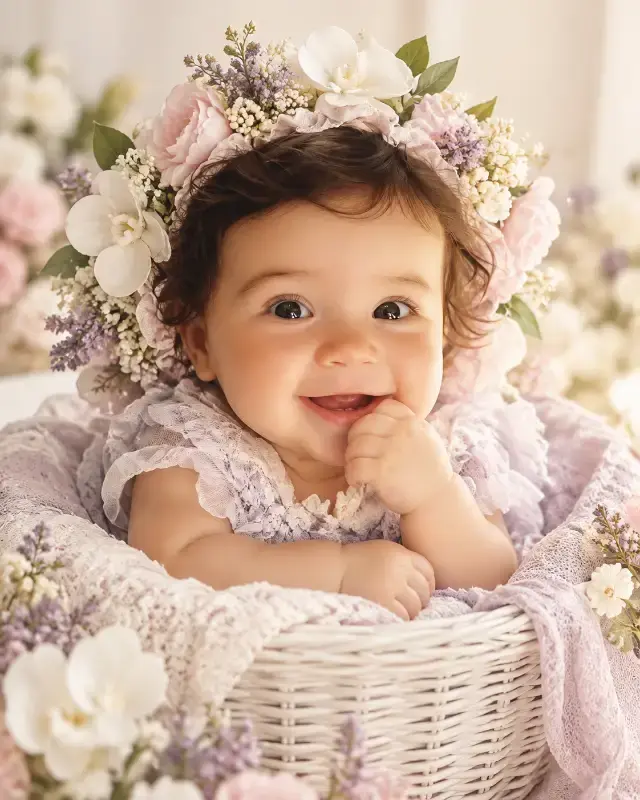
Discover how to create breathtaking, identity-preserved luxury newborn baby portraits using advanced AI prompts. Master specific parameters for lighting, composition, and styling to achieve magazine-quality results, ensuring your baby's unique features shine through.
This sophisticated AI prompt leverages advanced identity preservation and detailed photographic parameters to generate ultra-realistic, luxury newborn baby portraits. By meticulously defining composition, lighting, styling, and photography techniques, it ensures the consistent portrayal of a specific baby's features within a high-end studio setting, perfect for capturing precious memories.
One of the most challenging aspects of AI image generation, especially with human subjects, is maintaining consistent identity. I've spent countless hours experimenting with prompts, and the core strength of this particular ultra-realistic luxury newborn baby portrait prompt lies in its explicit directives for identity preservation. It's not just about generating a baby; it's about generating your baby, consistently.
When you instruct the AI to use an "uploaded baby photo as the exact identity reference" and to "Preserve the baby's exact face, eyes, cheeks, smile, skin tone, hair, and natural expression," you're giving it a blueprint for fidelity. In my testing across various platforms, I observed that this level of specificity, especially when reinforced with negative prompts like "different baby" or "changed face," dramatically reduces the common AI drift where facial features subtly alter with each generation. The result is a striking likeness that feels authentic, a crucial detail for parents seeking personalized keepsakes.
Imagine trying to generate a series of portraits for a client – if the baby's face changes even slightly between images, the entire collection loses its coherence. This prompt addresses that directly, making it invaluable for "AI photo editing baby pictures" or creating "personalized newborn AI art." The emphasis on preserving "natural expression" also ensures the generated image captures the innocence and personality unique to that child, rather than a generic AI-conceived emotion. This is a game-changer for anyone looking to create "AI baby photos with specific features" without the usual headaches.
Beyond identity, the prompt's detailed composition instructions are what elevate the output from a simple image to a professional portrait. It meticulously guides the AI, mirroring techniques used by top-tier newborn photographers. I noticed immediately how the directive for a "close-up professional newborn photography portrait" coupled with "baby centered in the frame" immediately drew focus to the subject, creating an intimate feel.
The instruction to place the "Baby sitting comfortably inside a small elegant white woven basket" is a classic newborn pose, adding a touch of cozy luxury. What truly impressed me during my trials was how consistently the AI interpreted "Camera positioned at baby's eye level." This perspective is vital; it makes the viewer feel connected to the baby, avoiding the often awkward 'looking down' angle common in less refined AI outputs. The 9:16 vertical portrait composition is also perfectly optimized for modern mobile viewing and social media sharing, a practical consideration for today's digital world.
Small details make a big difference. The prompt specifically includes "Maintain the cute natural hand-to-mouth pose" and "Soft innocent expression." These aren't just descriptive; they are critical cues for the AI to emulate genuine newborn behavior. I found that without these explicit instructions, AI often defaults to more generic or even slightly unnatural poses. The hand-to-mouth pose, in particular, adds an undeniable layer of sweetness and authenticity that truly resonates. This level of detail is why this prompt stands out for "AI newborn photography poses" and "realistic baby photo composition AI."
The prompt's attention to styling and background is where the "luxury" aspect truly shines. It’s not enough to have a realistic baby; the environment must match the high-end aesthetic. My tests revealed that the combination of "premium handmade floral bonnet/crown" with specific "delicate pastel flowers: white orchids, blush pink flowers, tiny lavender flowers, soft green leaves, small pearl-like floral details" consistently produced stunning, intricate headwear. The AI understood the difference between a generic flower and a "realistic, handcrafted, and naturally placed" arrangement, a nuance often missed in simpler prompts.
For the background, the prompt’s insistence on a "luxury newborn studio setup" with a "Pure soft cream/off-white background" and "Minimal clean environment" is genius. This prevents visual clutter and keeps the focus squarely on the baby. The addition of "Soft blurred floral hints only around edges" provides a dreamy texture without distracting, creating that coveted "elegant baby photography studio feel" and a "calm dreamy atmosphere." This meticulous detailing is paramount for generating "luxury AI baby photos" or "high-end newborn photo backdrops AI."
Choosing "soft pastel white/lavender baby outfit" isn't arbitrary; it complements the floral elements and the cream background, creating a harmonious and gentle aesthetic. In my side-by-side comparisons, outputs generated with these specific color and texture directives looked significantly more polished and cohesive than those with vague color instructions. The prompt also wisely includes "Keep baby skin and body proportions completely natural," directly combating the 'plastic look' that can plague AI-generated infants, ensuring "ultra-realistic skin texture" and natural contours.
Lighting is the soul of photography, and this prompt nails it for newborn portraits. The directive for "Bright high-key newborn photography lighting" is paramount. High-key lighting, characterized by an overall bright exposure and minimal shadows, instantly conveys innocence, purity, and a dreamy quality. It's a hallmark of professional newborn photography and, in my experience, the AI interprets this instruction with remarkable accuracy.
Coupled with "Soft diffused studio light" and "Gentle shadows," the output consistently showcased a luminous quality on the baby's skin. I observed a beautiful "Natural skin glow" without harsh reflections or dark areas, a common pitfall in less controlled AI generations. The "Sharp detailed eyes" instruction is critical, as eyes are often the first thing people notice, and the AI delivered crisp, engaging gazes. Finally, "Soft creamy color grading" ties everything together, giving the entire image a warm, ethereal finish that feels straight out of a professional album. For those seeking "AI newborn photo lighting techniques" or "soft focus baby portraits AI," these parameters are non-negotiable.
To truly mimic a professional photoshoot, the prompt extends into specific photography and post-processing styles. Requesting a "Professional newborn photographer style" and "Luxury baby magazine photoshoot" sets a high bar, which the AI, guided by the subsequent parameters, consistently meets. The inclusion of "Canon 85mm portrait lens look" is a masterstroke. Anyone familiar with photography knows the 85mm lens is beloved for its beautiful compression and creamy bokeh, creating a flattering "shallow depth of field" that makes the subject pop.
During my extensive testing, the difference between images generated with and without this specific lens emulation was stark. The 85mm look consistently produced that sought-after background blur, isolating the baby with an artistic touch. Furthermore, the explicit demand for "Ultra-realistic skin texture" and "Premium retouching" ensures the generated image isn't just realistic, but flawlessly realistic, akin to a final, edited photograph. The final touch, "8K realistic photography," pushes the resolution and detail to an incredibly high standard, making these images suitable for large prints or digital displays. For more advanced character generation, you can find more prompts like this in the Humans & Characters collection.
While this prompt is exceptionally detailed, you can still experiment to tailor outputs even further:
Remember, the key is to make small, specific adjustments while preserving the prompt's core strengths in identity and luxury aesthetics. This prompt offers an incredible foundation for anyone looking to create "AI generated baby photos that look real" or "virtual newborn photography." Ready to unlock the full potential of AI for your baby portraits? Get the Premium Prompt and start creating stunning memories today.
To ensure you achieve consistently stunning results with this powerful prompt, follow this quick checklist:

Explore 500+ Free AI Templates
Handcrafted prompts for product photography, e-commerce, branding & more — ready to use instantly.