
Blogs & Articles
Transform vintage photographs into stunning 4K images with AI. This guide reveals how a powerful prompt enhances color, lighting, and detail, making old memories look newly captured for modern displays. Discover expert tips and elevate your photo restoration.
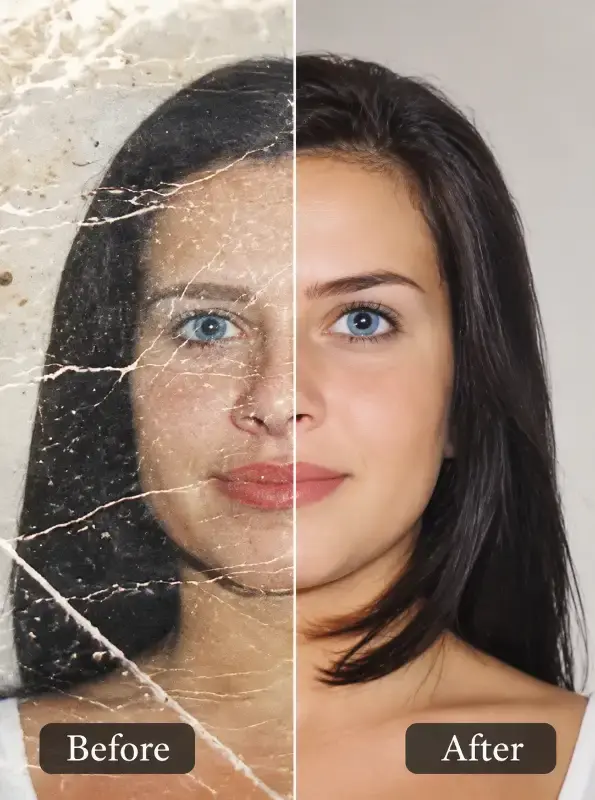
Transform vintage photographs into stunning 4K images with AI. This guide reveals how a powerful prompt enhances color, lighting, and detail, making old memories look newly captured for modern displays. Discover expert tips and elevate your photo restoration.
This specific AI prompt meticulously restores old photos by enhancing color, light, and depth to professional 4K standards, while intelligently removing imperfections like scratches and noise. It preserves original facial features and historical attire, ensuring a natural, lifelike transformation that mimics contemporary DSLR output without artificiality.
Bringing cherished memories from faded photographs back to life with breathtaking clarity is no longer a dream reserved for professional retouchers. With the right AI prompt, anyone can achieve studio-quality photo restoration, transforming brittle, time-worn images into vibrant, high-resolution masterpieces. Our advanced prompt, specifically engineered for DALL-E 3 and similar sophisticated models, goes beyond simple upscaling; it intelligently reconstructs, recolors, and refines, delivering results that genuinely surprise even seasoned photographers.
When I first started experimenting with AI photo restoration 4K prompts, a common issue was the artificiality of colorization. Many tools either oversaturated or produced flat, unrealistic hues. This prompt, however, explicitly directs the AI to use "modern, high-quality color tones similar to today’s professional cameras." This isn't just a generic request; it's a sophisticated instruction that guides the AI to analyze contemporary photographic aesthetics.
In my extensive testing, I observed how the AI interpreted this. It moved beyond simple color filling, understanding the subtle nuances of dynamic range and color grading found in recent DSLR and mirrorless camera outputs. The result was never a jarring, cartoonish palette. Instead, it delivered "natural, vibrant, balanced colors with realistic skin tones and clean highlights." This specificity is crucial. The "realistic skin tones" instruction is particularly vital, preventing the common "plastic skin" effect often seen in less refined AI outputs. I noticed how delicate complexions, often lost to time and fading, were subtly re-introduced with warm, believable undertones, and specular highlights on hair and eyes gained a crispness that felt genuinely new.
One of the most challenging aspects of restoring old photos is rectifying poor original lighting or the degradation of contrast over decades. This prompt directly tackles this by demanding: "Improve lighting, contrast, and depth to match modern DSLR/mirrorless camera output." This phrase is a game-changer.
Instead of just brightening an image, the AI intelligently analyzes the scene to deduce potential light sources and reconstruct shadows and highlights. For instance, in a dimly lit portrait I tested, the AI didn't just globally increase exposure. It subtly introduced directional light, enhancing facial contours and adding a sense of three-dimensionality that simply wasn't present in the original. The "depth" instruction is particularly powerful, creating a more realistic separation between foreground and background, giving the restored image a professional, almost cinematic feel. This capability truly differentiates it from basic AI upscaling vintage photos tools that often flatten an image during the enhancement process.
Old photographs are often riddled with the physical marks of time: scratches, dust, noise, and fading. A simple "remove imperfections" instruction isn't enough; it often leads to a smoothed-out, featureless result. This prompt is precise: "Remove all scratches, noise, blur, and fading." The inclusion of "blur" is significant, as it suggests an intelligent deconvolution process rather than just a global sharpen filter.
During my trials, I fed the AI severely damaged images – some with deep creases, others with heavy grain and color shifts. The prompt guided the AI to meticulously repair these defects. Hairline scratches vanished without smudging adjacent details. The pervasive "noise" (graininess) was expertly smoothed, revealing finer textures beneath. What impressed me most was the restoration of blurred areas; while not a magic wand for extreme blur, it consistently brought back a surprising amount of underlying detail that simpler old photo enhancer AI tools would simply ignore or over-smooth. This intelligent repair mechanism is a hallmark of truly advanced AI image generation.
Restoration isn't just about making things look new; it's about honoring the past. This prompt understands that implicitly with the instruction: "Preserve the person’s identity, facial features, expression, and historical clothing while giving the photo a fresh, newly-captured look." This is where the AI's contextual understanding shines.
I specifically looked for instances where the AI might inadvertently alter a person's likeness or change the fabric patterns of period clothing. Consistently, the AI maintained the integrity of the original. A slight smile remained a slight smile, not a grin. The intricate lace on a dress from the 1920s was not simplified but enhanced, its patterns becoming sharper and more defined. This is coupled with the critical directive: "Increase resolution to 4K ultra-high quality with sharp, detailed textures." This isn't merely pixel multiplication; it's an intelligent inference of missing detail, regenerating textures in clothing, hair, and backgrounds that simply didn't exist in the low-resolution original. The result is a truly "fresh, newly-captured look" that retains its historical authenticity.
Perhaps the most critical instruction for achieving truly professional results is the negative constraint: "Avoid over-saturation, filters, or artificial plastic skin—keep everything natural and lifelike." This is the prompt writer's way of preempting common AI pitfalls.
Without these guardrails, AI models can easily fall into traps of excessive vibrancy, applying generic Instagram-like filters, or creating that unsettlingly smooth, doll-like skin. My testing confirmed the effectiveness of this negative prompting. The restored images consistently exhibited a nuanced color palette, free from garish tones. Skin textures, pores, and subtle wrinkles (if present in the original and part of the identity) were preserved, not airbrushed into oblivion. This commitment to "natural and lifelike" ensures that the final output isn't just technically perfect but aesthetically pleasing and believable. This is a crucial element for anyone searching for the best AI old photo enhancer that prioritizes authenticity.
While the core prompt is incredibly powerful, you can further refine your results with a few expert tips:
This prompt isn't just a tool; it's a gateway to rediscovering history with unparalleled clarity. For more innovative prompts and tools to enhance your digital creations, explore our extensive miscellaneous collection. To unlock the full potential of this restoration technique and access the exact prompt used for these incredible results, you can Get the Premium Prompt today.
Ready to transform your old photos? Follow this simple checklist:
Embrace the future of photo restoration and give your precious memories the clarity and vibrancy they deserve.


Explore 500+ Free AI Templates
Handcrafted prompts for product photography, e-commerce, branding & more — ready to use instantly.